An End of Year Archive will preserve historical data by revoking the authority to edit or remove classrooms from the previous school year.
Archiving Overview
Refrain from removing students or editing/deleting classes from the previous school year. To preserve historical data, classrooms from the previous school year will need to be archived, and new classes will need to be created for the new school year.
- Classes and student data from the previous school year will be automatically archived the first time rosters are imported for the new school year after the rollover date has occurred.
- If you create classes and add students manually, the End of Year Archive must be performed before creating classes for the new school year.
- We recommend that the individual responsible for roster management also take responsibility for archiving. They will be in the best position to know the appropriate time to transition between school years.
What does Archiving do?
- Preserves historical data by revoking the authority to edit or remove classrooms from the previous school year. Managers and teachers will no longer be able to add or remove students from archived classrooms.
- Teachers will no longer have access to view or run reports for prior-year classrooms. This operation does not affect teachers' access to current year classrooms.
- Revokes student access from school and from home (if applicable). Student access is restored when students are added to classrooms for the new school year.
- Archiving does not delete any student data from the previous school year. Managers can continue to run historical reports for prior school years.
- Reduces clutter by hiding classrooms from the previous school year, so that only current year classrooms appear when viewing class lists.
Step-by-Step Guide to Perform an Archive
The steps below should ONLY be done at the end of summer before the new school year begins. When rosters are updated, or data is archived before the new school year begins, student accounts and data will be temporarily inactive until the start of the new school year.
Step 1: Select the Administration tab at the top of the screen.
Step 2: Select Import & Roster Management, and then select End of Year Archive from the menu on the left.
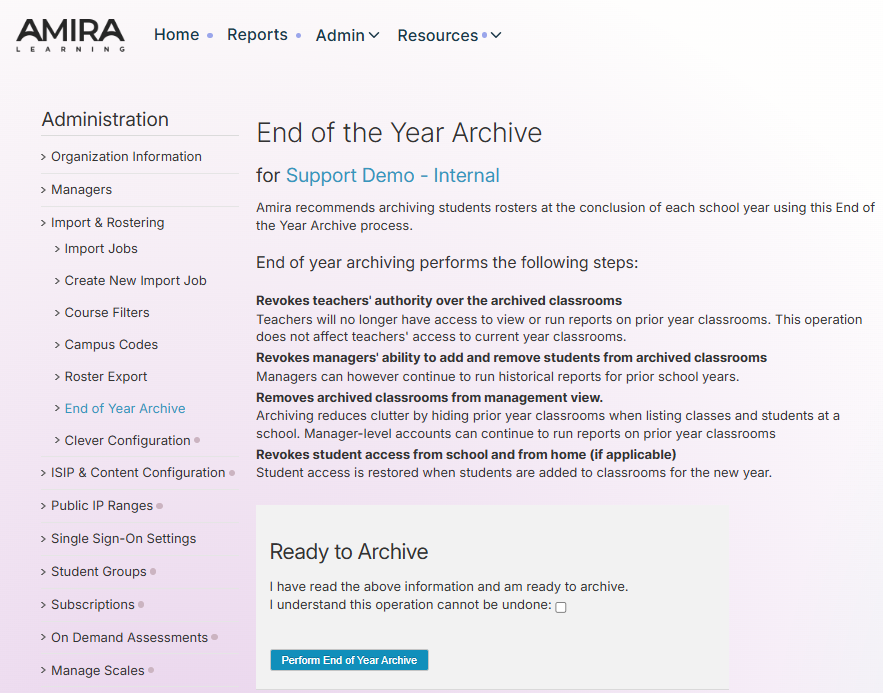
Step 3: Check the box agreeing to the archive and select Perform End of Year Archive.
End of Year Archive FAQ
What will the end-of-year archive do?
- The end-of-year archive does not delete any student data. It will archive all the classes from the previous school year so that teachers will not see the inactive classes when they log in.
When should I perform the end-of-year archive?
- The archive should only be done at the end of the summer before updating classes for the next school year.
Will the data automatically be archived at the beginning of the school year?
- The data will only be archived automatically if the new school year rosters are imported into Amira Learning.
- The data will be archived automatically upon the first import performed for the new school year after the school year rollover date.
Does the data need to be archived to update classes manually?
- If the classes are updated manually, then the end-of-year archive will need to be performed before updating classes for the new school year.
- If the end-of-year archive is done after updating for the new school year, then the inactive classes from the previous school year will still show up for teachers. This can cause issues if teachers update or delete the classes from the previous school year.
How do I change my rollover date?
- The rollover date field is intentionally locked and cannot be changed by an administrator. Please contact support@amiralearning.com or to request a change.