The Priority - Student Intervention History report allows teachers to access a student's individual list of priority alerts, and add additional intervention notes.
A Student Intervention History of identified skill weaknesses and interventions is retained and can be updated to reflect new interventions. Additional notes can be added by pressing Add Intervention Note, typing in the space provided, and then pressing Submit to save.
This report allows for the inclusion of intervention from any source. Teacher-directed lessons are also accessible from this report. A history of weaknesses and interventions from year to year is available. Interventions for previous school years can be accessed by expanding the selected year. We recommend using this report to document all interventions provided by instructors and discuss student historical performance and progress with parents, administrators, or the intervention team.
How to Run
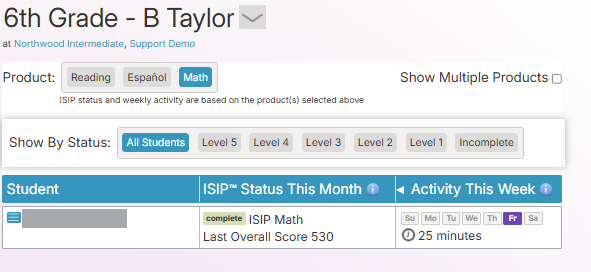
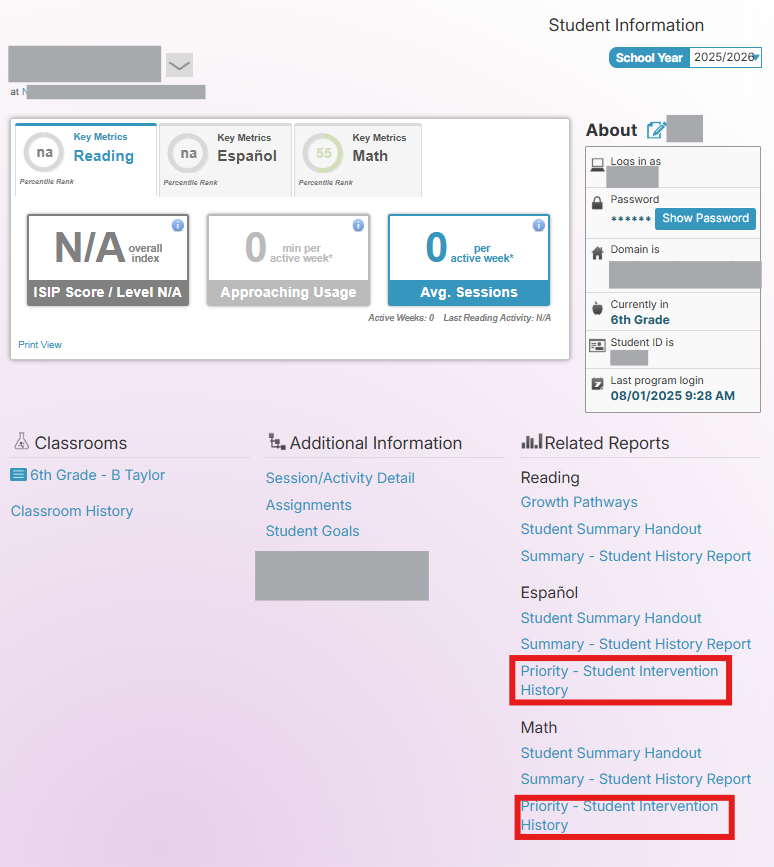
Once you have logged in to Amira Learning and selected Lectura & Math, choose the desired student in your classroom page. Select Priority - Student Intervention History under the appropriate product in the Related Reports section.