| Math/Lectura |
The Usage Report shows student usage by tier or level for campuses and classrooms.
The report can be run at a class, school, or district level, depending on the level of access and desired information. Teachers can run a classroom report. Campus Managers can run a school-level or classroom report. District Managers can run reports for the district, school, or class. We suggest you use this report to evaluate and modify student usage plans, and review it weekly to make any needed adjustments to usage plans and computer access.
Step-by-Step Guide to Run the Usage Report
Step 1: Log into Amira Learning and select Lectura & Math.
Step 2: Click on the Report tab.
Step 3: Select Lectura or Math from the Products list
Step 4: Select Usage from the Reports window and click Run Selected Report.
Step 5 (optional): If running as a manager, click the Customize Report button and select a campus or classroom from the Targeted Users tab.
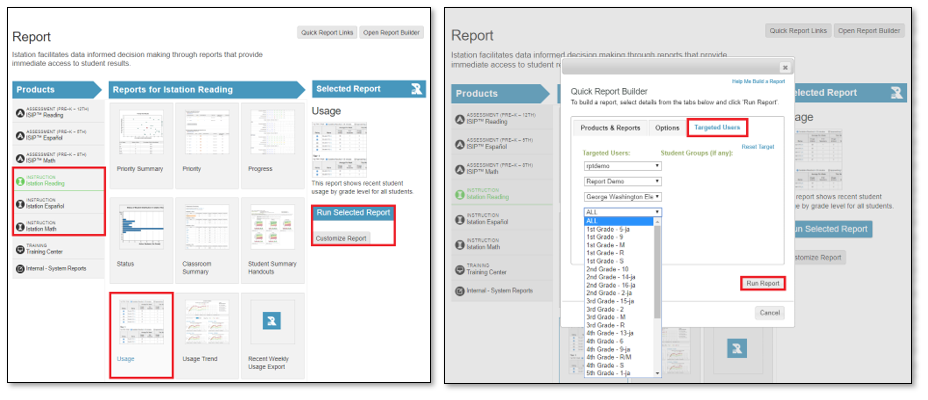
A Quick Report Link can be saved to access the report from the home page in the future.
Manager View
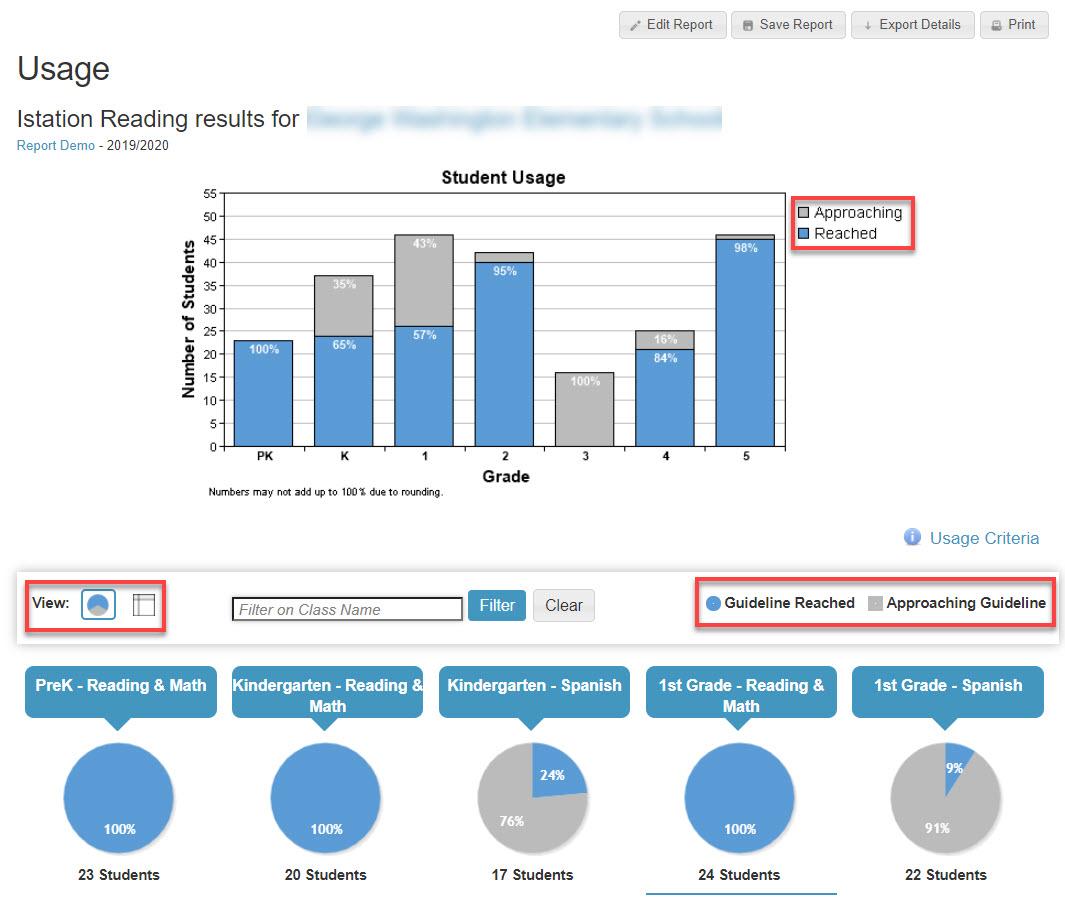
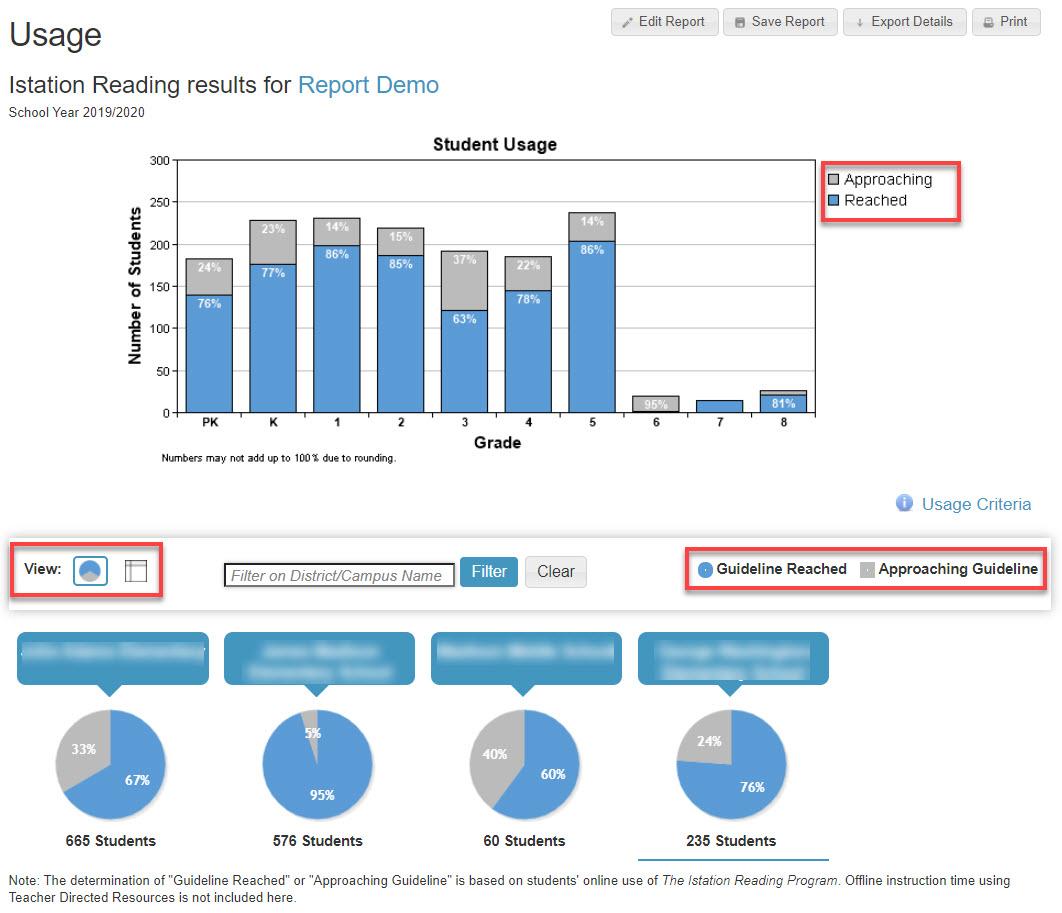
Usage for a campus or district is shown as an overall bar graph for the campus or districts divided by grade level. The blue shading represents the percent of students who have reached the usage guideline and the gray shading represents the percent of students who are approaching the usage guideline.
Under that graph are pie charts depicting usage in either schools or classrooms. The view can be changed from pie charts to a table by clicking on the appropriate icon.
Usage is categorized as Approaching Guideline (Gray) or Reached Guideline (Blue).
Clicking on either a pie chart or a plus sign (table view) allows the user to view the usage report at the next level in the hierarchy
The following data points are shown on the Usage Report:
| Campus Usage | District Usage |
|
|
|
|
|
|
|
|
 |  |
Teacher View
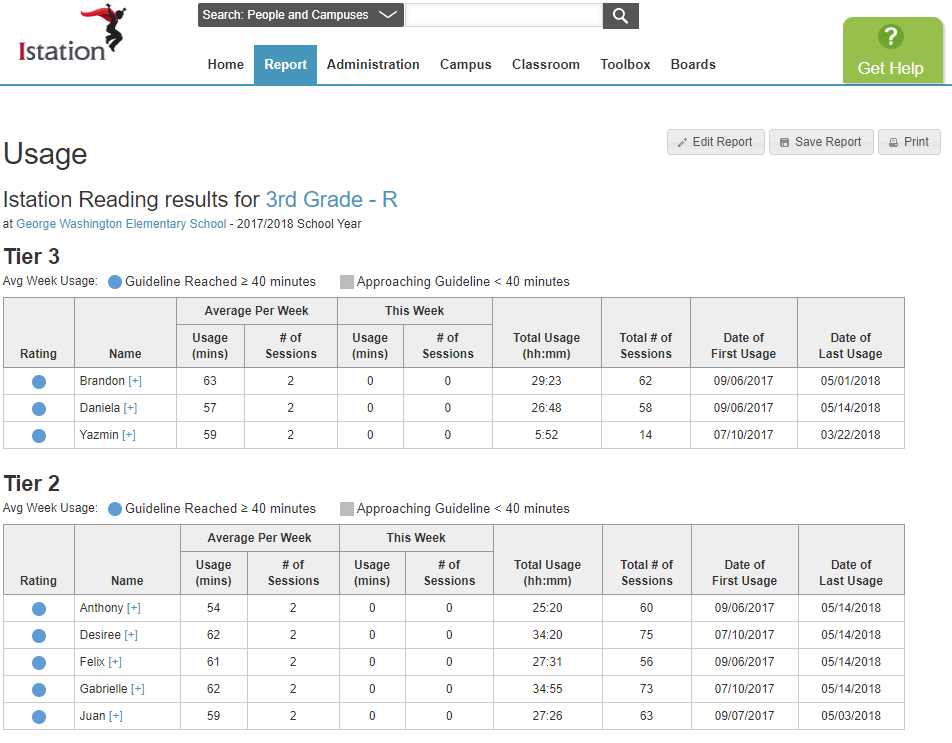
Students are grouped by instructional tiers or levels determined by their ISIP™ Assessments and are labeled as "Guideline Reached" or "Approaching Guideline."
The Usage Report shows the following data:
- The average usage and sessions per week.
- The usage and number of sessions "This Week".
- The total usage for the school year.
- The total number of sessions for the school year.
- The First and last dates of usage.
Lectura/Math Usage Guidelines
Our usage guideline for the digital component is 30+ to 40+ minutes per student per subject per week. This guideline holds for both Lectura and Math and account for a monthly ISIP™ assessment.
- 30+ minutes per week: Suggested for Tier 1 students (Levels 3, 4, and 5)
- 40+ minutes per week: Suggested for Tier 3 and Tier 2 students (Levels 1 and 2)
As with any supplemental or intervention program, a consistent approach is highly recommended and shown to result in the greatest gains for students.
How much can a student expect to grow under these usage guidelines?
The current usage guidelines are derived from the usage patterns that establish our Instructional Tier Goals. The Tier Goals show the expected growth for a student in a given academic year. Please note that growth for any one student is highly dependent on the overall instructional model and the full supports offered to that student. Time spent in the digital curriculum will aid in this growth but is not a comprehensive determinant of ISIP results.