| Math/Lectura |
Teachers who have access to the online instruction with their subscription can assign lessons from the Classroom tab.
Assignments are an optional feature; students are automatically placed in their instructional path after completing the ISIP assessment. This feature simply allows teachers to have students complete specific lessons on desired skills.
Assigning Lessons To Students
Step 1: Log in to secure.app.amiralearning.com and select Math/Lectura.
Step 2: Navigate to the classroom for which you wish to create an assignment.
Step 3: Select Assignments from the left column.
Step 4: Click Create Assignments.
Step 5: Select students.
Step 6: Click Proceed to Select Activities.
Step 7: In the Sections drop-down menu, choose Lectura or Math.
Step 8: Select an activity. You can learn more about activities by hovering your mouse over their titles.
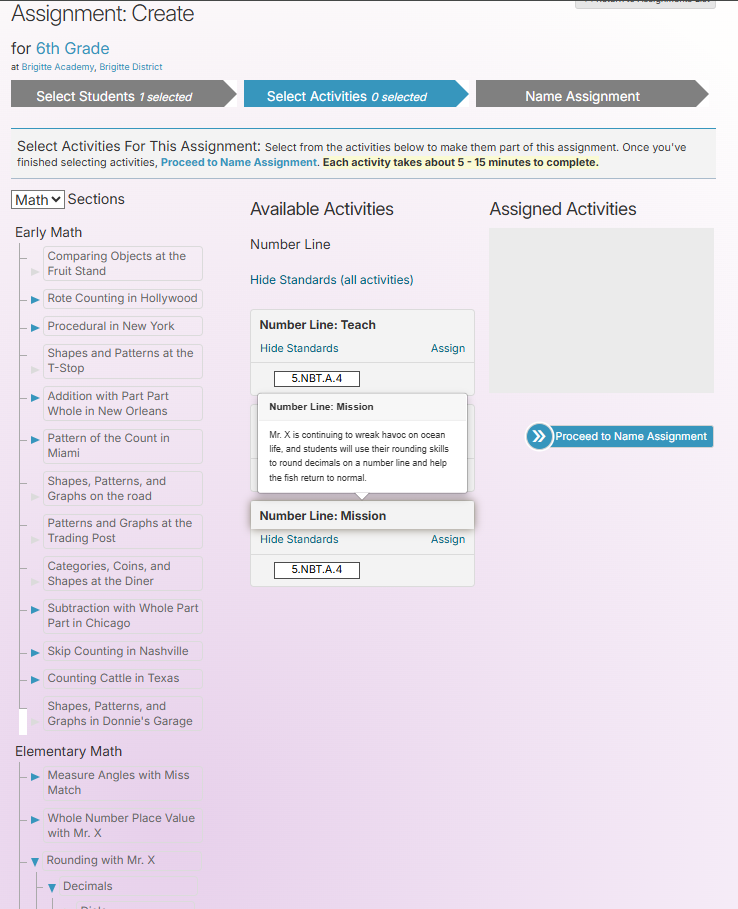
Step 9: Click Proceed to Name Assignment.
Step 10: Enter the name of the assignment.
Step 11: Click Create Assignment. This will assign the activity to the selected students.
Checking Assignment Completion
Step 1: Log in to secure.app.amiralearning.com and select Math/Lectura.
Step 2: Navigate to the classroom for which you wish to check assignment completion.
Step 3: Select Assignments from the left column.
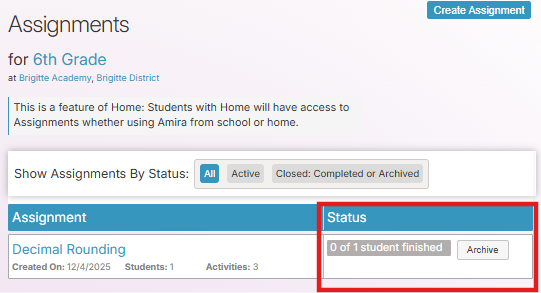
Here, you will be able to see how many of your students assigned to this lesson have completed it.
Step 4: Click on the name of the activity you would like more information on.
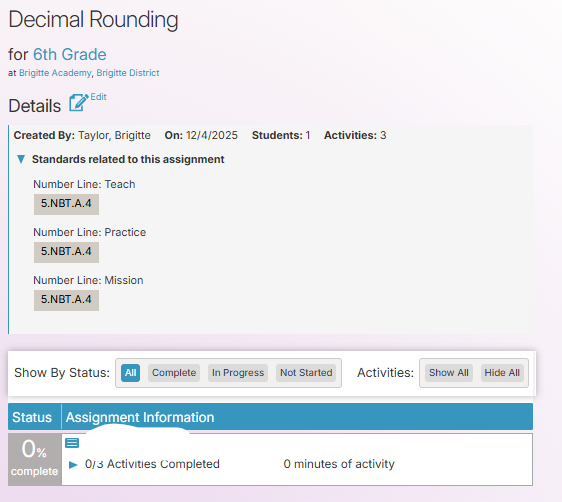
Here, you can see the status of individual students and the percentage of the assignment(s) they have finished.